

What starts each metric
To turn on the app embed, see Turn on analytics.
Not counted yet
If Block Hero hasn’t started counting a metric for your store, you see a dash, or Not counted yet. Hover over it to see why:- Block Hero starts counting this once its analytics embed is on in your theme.
- Block Hero starts counting orders from the first order Shopify confirms for this store.
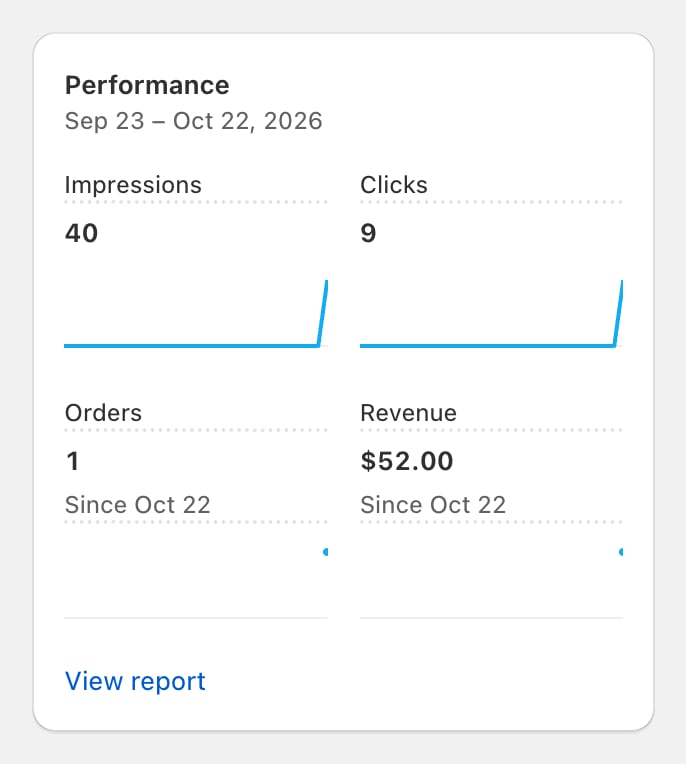
Since a start date
When your date range starts before Block Hero began counting a metric, you see Since and the start day next to the number, for example “Since Oct 4”. Hover over it to read “Block Hero started counting” the metric on that day. Earlier days in the range aren’t counted.- Rates, such as Conversion rate or Added-to-cart rate, use only the days from the start date onwards.
- Charts leave a gap before the start date rather than showing zeros.
- If your whole range ends before the start date, you see a dash. The tooltip says when Block Hero started counting.
Shoppers who decline tracking
Block Hero follows each shopper’s choice in your store’s cookie banner. It counts a shopper only when they allow analytics.- Shopper declines analytics: nothing is counted for them. No impressions, clicks, sessions, add to carts, checkouts or orders.
- Shopper accepts later: content they can see on the page is counted as an impression once they accept. A click they made before accepting isn’t counted. Clicks after accepting are.
- Shopper withdraws consent: Block Hero stops counting them from then on.
- No consent answer can be read: Block Hero counts nothing for that shopper.
Not counted in the theme editor
Views and clicks in the theme editor or a theme preview aren’t counted. Check your numbers against your live storefront.Related
Turn on analytics
Switch on the Block Hero analytics app embed.
Compared to Shopify
Why these numbers differ from Shopify Analytics.